

Skool Pricing 2026: Which Plan Is Best for You?
Trying to decide between the $9 “Hobby” plan and the $99 “Pro” plan on Skool? You’re not alone. Skool keeps pricing refreshingly simple in 2026—two plans, a free trial, and (usually) one big question: Should I start cheap… or go Pro from day one?
This page breaks down the current Skool pricing, the real-world differences between Hobby vs Pro, who each plan is meant for, and exactly when it makes sense to upgrade (or even downgrade). I’ll also show you a quick “money math” rule of thumb so you can pick the right plan without overthinking it.
Quick note: Pricing/features can evolve. I update this “2026” guide to match what Skool currently shows in their checkout/help docs, but always double-check inside your account before committing.
Skool Pricing 2026 (At a Glance)
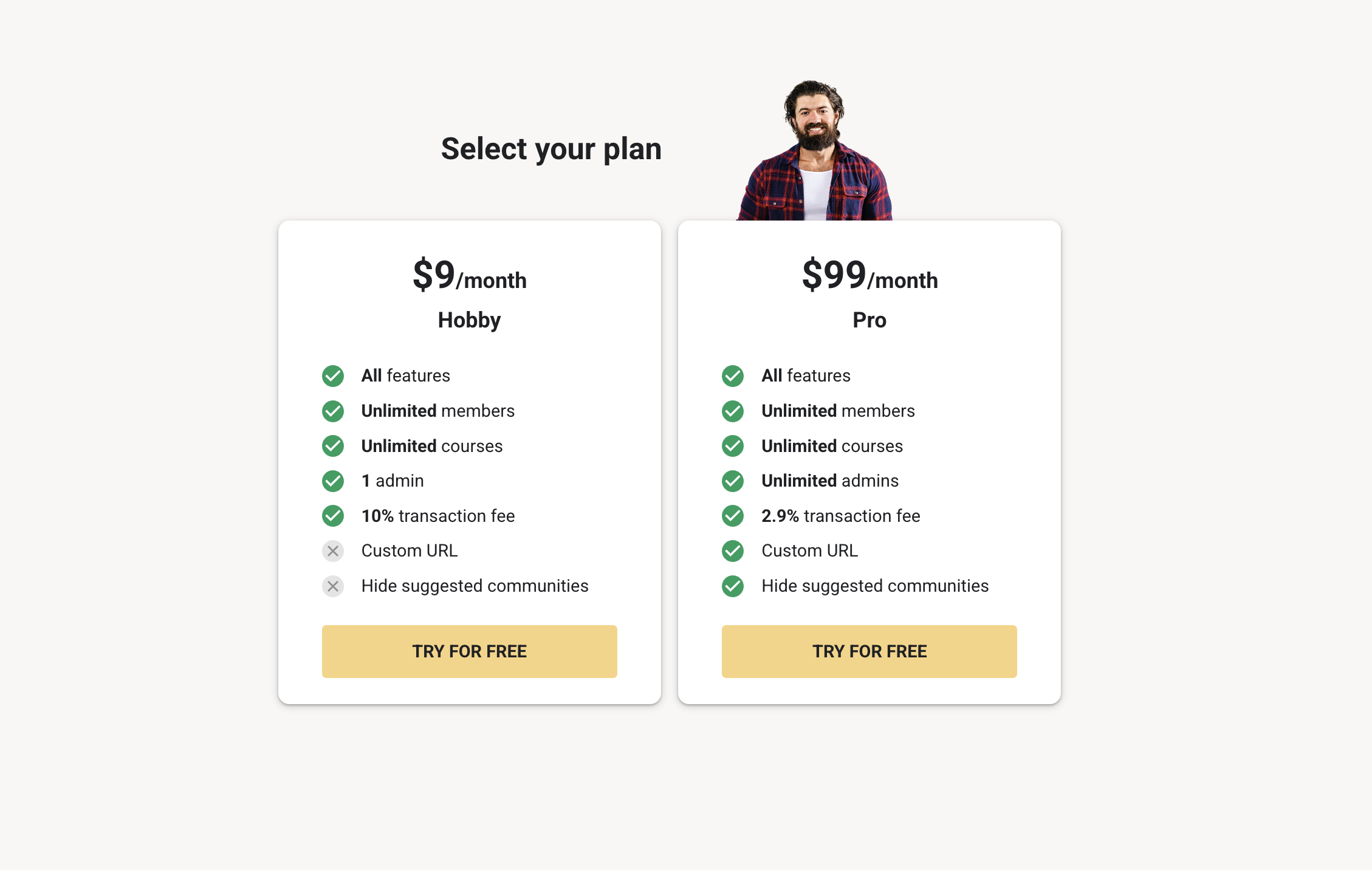
Skool offers a 14‑day free trial, then you pick one of two plans:
| Plan | Monthly Price | Transaction Fees (Payments) | Best For |
|---|---|---|---|
| Hobby | $9/month | 10% + $0.30 per transaction | Testing an idea, free communities, solo creators who aren’t processing much revenue yet |
| Pro | $99/month | 2.9% + $0.30 (under $900) / 3.9% + $0.30 (above $901) | Scaling paid memberships, teams, automation, lower fees, brand polish |
The punchline: Hobby is the low-cost on-ramp. Pro is the “serious business” tier that usually becomes the better deal once you’re earning consistent monthly revenue (because the transaction fee difference starts to matter a lot).
What You Get on Both Plans
Regardless of whether you choose Hobby or Pro, the core Skool experience is built around one simple idea: community first, content second. You typically get the essentials creators actually care about:
- Community feed (posts, comments, pinned content)
- Classroom for organizing lessons/courses
- Calendar + events for live sessions, calls, meetups
- Gamification (levels/points/leaderboards) to boost engagement
- Built-in payments for subscriptions (fees depend on plan)
- Video + live streaming capabilities (as shown on Skool’s pricing page)
So you’re not choosing between “basic features” vs “real features.” You’re choosing between limits + higher fees (Hobby) vs more control + lower fees (Pro).
Hobby Plan ($9): Who It’s For (and When It’s Perfect)
The Hobby plan is designed to remove the “$99 barrier” and make it easy to start. It’s ideal if you want to build momentum first and worry about optimization later.
Choose Hobby if you’re in one of these situations:
- You’re validating a niche (you’re not sure the community will take off yet).
- You run a free community and primarily monetize elsewhere (coaching, consulting, services, YouTube, etc.). If you’re not processing payments inside Skool, the transaction fee doesn’t really matter.
- You’re solo and don’t need multiple admins.
- You want to learn the platform and set up your classroom, onboarding, and posting rhythm before going “all-in.”
The trade-offs you should actually care about
Here’s where Hobby can become limiting once you start winning:
- Higher transaction fees: Hobby takes a larger cut on payments processed inside Skool. This is the #1 reason most creators eventually upgrade.
- Solo admin setup: If you need a team (VA, community manager, moderators with admin permissions), you’ll likely outgrow Hobby quickly.
- Less control over growth tools: Many of the “scale features” (automation/integrations/advanced plugins) are Pro-level territory.
- Brand polish limitations: If clean branding matters (like a clean community URL and fewer distractions), Pro is usually the move.
My honest take: Hobby is amazing for starting. But if your community is paid (or you plan to make it paid), treat Hobby as a launchpad—not your final destination.
Pro Plan ($99): Who It’s For (and Why People Upgrade)
The Pro plan is built for creators who want to run a real membership business—with lower fees, more admin flexibility, and access to the tools that make scaling smoother.
Choose Pro if you want any of the following:
- Lower transaction fees (usually the biggest financial win).
- More than one admin (Pro is required to add multiple admins; Skool allows up to 30 admins).
- More automation + integrations (several advanced plugins are Pro-only, like AutoDM and Zapier-related features).
- Member affiliate/referral system inside your community (Pro-only).
- Better brand control (like claiming a cleaner URL and reducing “distractions” such as suggested communities).
- Ownership flexibility (ownership transfer is supported on Pro).
If you’re serious about retention, onboarding, tracking, and building a long-term asset, Pro tends to feel like the “default” plan—especially once you have a few dozen paying members.
The Money Math: When Pro Becomes Cheaper Than Hobby
Here’s the part most people miss: Pro can literally cost less than Hobby once your revenue grows—because the fee savings can outweigh the extra $90/month platform cost.
Rule of thumb for most memberships:
If your payments are under $900, Hobby charges ~10% and Pro charges ~2.9%. That’s a 7.1% difference.
Break-even point (roughly): when you process about $1,300/month through Skool, Pro often “pays for itself” vs Hobby.
Want concrete examples? Here are fast “member count” break-evens (approx.):
| Your Monthly Price | Rough Break‑Even Paying Members (vs Hobby) | What It Means |
|---|---|---|
| $19/month | ~67 members | Great for large, low-ticket communities (upgrade later). |
| $29/month | ~44 members | Common coaching/community price point—Pro becomes attractive fairly quickly. |
| $49/month | ~26 members | If you’re serious, Pro usually makes sense once you’re stable here. |
| $99/month | ~13 members | High-value memberships often should start on Pro immediately. |
High-ticket note: For payments above ~$901, Pro’s percentage is higher than 2.9% (it can be 3.9%), so the break-even can shift slightly upward. But for typical monthly memberships, most payments stay under that threshold anyway.
When Should You Upgrade from Hobby → Pro?
If you start on Skool Hobby (smart), upgrading doesn’t need to be emotional. Use a simple checklist.
Upgrade to Pro when:
- You’re consistently processing around $1,300/month+ inside your Skool community (so the fee savings matter).
- You want to add more admins (community manager, VA, partner, etc.).
- You want automation and integrations (for onboarding, tracking, workflows).
- You want to set up member referrals/affiliates inside your community to drive organic growth.
- You care about cleaner branding (and reducing distractions).
Pro tip: Many creators do this: start on Hobby → build the habit + content library → switch to Pro the moment revenue becomes “real.” That way you don’t overpay early, but you also don’t get stuck paying unnecessary transaction fees later.
When Does It Make Sense to Downgrade Pro → Hobby?
Downgrading can be smart too—especially if your business model changes. Consider going back to Hobby if:
- You’re running a free community and don’t process payments inside Skool (transaction fee becomes irrelevant).
- You’re intentionally pausing paid growth for a season and want to keep the community alive at the lowest cost.
- You no longer need multiple admins or Pro-only tooling.
Reality check: If you’re actively selling memberships inside Skool, downgrading rarely makes sense once you’re at meaningful volume—because the extra transaction fees usually cost more than the $90/month you “save.”
How You Can Charge Members Inside Skool (Pricing Models You Can Use)
This is one of the most underrated parts of Skool: you’re not stuck with only one way to monetize. Depending on your offer, Skool supports multiple pricing approaches for your members (separate from what you pay as a group owner).
- Free group: Great for building audience, trust, and a pipeline.
- Subscription group: Monthly or annual memberships (you can also offer a free trial to members).
- Freemium: A free plan + a paid plan inside the same group (members can upgrade anytime).
- Tiered pricing: Multiple paid tiers for different levels of access/benefits.
- One-time payment: Perfect for lifetime access, pop-up cohorts, workshops, or “paid challenge” groups.
Why this matters for your plan choice: the more you monetize inside Skool (tiers, paid upgrades, higher conversion), the more Pro starts making financial sense—because every payment is affected by transaction fees.
Payments, Payouts, Currency, and Taxes (What to Expect)
If you’re building a paid community, you also need to understand how money actually flows inside Skool. Here are the highlights creators usually care about:
- Members pay in USD (Skool subscription prices are in USD).
- Payouts arrive in your local currency (Skool pays out to your bank account via Stripe Express connection; it’s not the same as using your own Stripe account).
- Payouts happen weekly (and the first payout can take longer due to checks/verification).
- VAT/sales tax: Skool handles VAT/sales tax compliance for you in many cases, which removes a big admin headache for international communities.
- Member self-serve: Members can usually cancel, update payment methods, and download receipts themselves—less support burden for you.
Bottom line: Skool is built to reduce operational friction for memberships—so you spend more time building value, not chasing invoices.
Bonus: Skool’s Affiliate Program (Extra Income Stream)
If you genuinely like Skool, there’s a second “pricing” angle most people ignore: Skool pays affiliates 40% recurring when you refer someone who starts a community.
So if you teach community building, coaching, online business, or you simply have an audience that wants a platform recommendation, that recurring commission can become a real side stream—especially when you refer Pro creators.
My Recommendation for 2026 (Simple Decision Framework)
If you want the simplest answer that still holds up in the real world:
- Start with Hobby if you’re early, solo, or running free (and you’re not processing meaningful payments yet).
- Start with Pro if you already have an audience, you’ll charge from day one, or you want team + automation.
- Upgrade to Pro the moment you’re consistently around ~$1.3k/month in revenue processed through Skool (or once your admin/automation needs grow).
FAQ: Quick Answers (So You Don’t Get Stuck)
Is there a permanent free plan?
No—Skool typically offers a free trial, then you pick Hobby or Pro. You can run a free community for members, but as the group owner you’re on a paid plan after the trial.
Can I switch plans later?
Yes—most creators start on Hobby and upgrade later (or test Pro during the trial). Switching plans is one of the easiest ways to optimize profit once you have traction.
Do transaction fees apply if my community is free?
If you’re not processing member payments inside Skool, there’s no payment transaction to fee—so the main “cost” is simply your monthly plan.
What happens if I raise my membership price?
Skool supports “grandfathering” in many cases—existing members can stay at their current price while new members pay the updated rate. (Always confirm inside your billing settings before making changes.)
What if someone’s card fails?
Skool typically retries failed payments and prompts the member to update their card—helpful for retention and reducing admin work.
Final Thoughts
Skool pricing in 2026 is simple on purpose: you either want the cheapest way to start (Hobby) or the most efficient way to scale (Pro). The “right” plan isn’t about hype—it’s about your current stage.
If you’re still unsure, here’s the safest move: start the free trial, build your group, and test your setup. Once you see real demand (and real payments), the upgrade decision becomes obvious.
Affiliate disclosure: This page contains affiliate links. If you sign up through them, I may earn a commission at no extra cost to you. I only recommend Skool because it’s genuinely one of the simplest platforms for building a community-driven business.
“`


