

Skool is an all-in-one online community platform that combines discussion forums, course hosting, events, and gamification under one roof. Launched by Sam Ovens (of Consulting.com) in 2019 and opened to the public in 2022, Skool has quickly attracted creators, coaches, and businesses looking to engage their audiences in a distraction-free environment. In this 2025 review, we’ll explore Skool’s key features, recent updates, pros and cons – all to help you decide if it’s the right platform for your community or membership site. We’ll also highlight new improvements like the polished mobile app, an annual billing option, and a generous affiliate program that lets you earn 40% recurring commissions for life. Let’s dive in!
Pros and Cons Summary
To give you a quick overview, here is a summary of Skool’s strongest points and where it falls short:
| Pros | Cons |
|---|---|
| All-in-one platform – Combines community discussion, courses, events, and more in one place, eliminating the need for multiple tools. | No built-in quizzes or assessments – Lacks course quiz and testing features out of the box. |
| Engaging gamification – Points and levels system boosts member participation (e.g. unlock content at higher levels). | No native video hosting – Videos must be embedded from YouTube, Vimeo, etc., as Skool doesn’t host videos itself. |
| Unlimited courses & members – One flat $99/mo plan includes unlimited community members and course content (no per-user fees). | Limited group chat – While 1:1 direct messaging is included, there’s no real-time group chat channel beyond the forum-style posts. |
| Distraction-free community – Private platform with no ads or unrelated content to derail engagement. | No free plan – Only a 14-day free trial is available, after which it’s paid (though there is a new annual discount option). |
| Mobile apps (iOS & Android) – Fully-featured apps with push notifications keep members engaged on the go. | Course features basic – Course builder is straightforward but lacks advanced LMS tools like graded assignments or certificates. |
Table: Skool’s main advantages and drawbacks in 2025.
Despite a few missing features, Skool’s value lies in its simplicity and community-driven approach. Next, let’s examine each aspect of the platform in detail – with updated information as of 2025 – so you can determine if Skool fits your needs.
What is Skool? (Platform Overview)
Skool is a community-centric platform that lets you host an online group with built-in course delivery and events scheduling. In other words, it merges the functionality of a Facebook group (but without the ads or distractions) with that of a course platform like Kajabi or Teachable – all in one login. Co-founder Sam Ovens created Skool after seeing that traditional online course platforms lacked social engagement, and community forums were often scattered on external sites. Skool’s solution was to put community first as the core, and layer on learning features (lessons, calendars, etc.) to keep members learning and interacting in the same hub.
If you are a coach, educator, or course creator who wants to bring your people together, Skool provides a clean and intuitive space to do so. Members join your Skool group (public or private) and get access to a Facebook-like newsfeed for posts, a “Classroom” tab for course content, a Calendar for events, and a gamified leaderboard for fun. Everything is organized within a single platform, which dramatically reduces tech complexity for you and friction for your members. As one reviewer put it, the learning curve for Skool is only a few seconds – it’s that easy for both admins and members.
How Skool Works: You pay for a Skool group (one group per subscription). Skool offers one simple plan at $99 per month (now with an annual option for about 16% off) which includes unlimited members, courses, posts and all features. You can charge your members for access (Skool integrates with Stripe to collect subscriptions for your community), or you can run a free community – the choice is yours. There’s no revenue share taken on your sales, just the flat fee to use the platform. This predictable pricing means if your community grows from 10 to 1,000 members, your Skool cost stays the same. Skool’s ethos is “less is more.” It intentionally does not have some bells and whistles of complex LMS or forum software – and many users appreciate its focused feature set that “gives you everything you need, and nothing you don’t”. Now, let’s look at each major feature area of Skool with visuals.
Community: Posts, Profiles & Discussion

Figure: The Skool community feed feels like a private social network for your members. Users can make posts (with text, images, or embedded videos), ask questions, and interact via comments and likes. You can create discussion categories to organize topics (announcements, Q&A, etc.), and pin important posts to the top. The interface is clean and minimal – no ads, no algorithmic clutter – which helps keep the focus on peer-to-peer engagement. On the right side, each group has an About card (with a description, member count, and join button for public groups) and a mini leaderboard of top contributors. Members also each have a profile page where their activity and “level” (from gamification) is displayed.
Skool’s community design encourages daily interaction. Members get notified (web or mobile push) for new posts, comments, @mentions, etc., ensuring they come back regularly. Unlike Facebook or Discord, everything in Skool is 100% private to your group and distraction-free. This creates a sense of intimacy and trust that’s great for paid communities or masterminds – your content isn’t competing with a thousand other groups in a social feed. As one user noted, Skool “is a place for genuine conversations and connections without the noise”.
Direct Messaging: In addition to group posts, Skool includes 1:1 chat between members. Anyone in the community can send a direct message to anyone else (unless restricted by the admin). This is useful for networking and support. However, there is no group chat feature or channel-based chat like Slack; all group discussion happens via the community feed or comments. Some users have requested more real-time group chat options, but currently Skool opts for the forum-style approach for group communication (which works well for threaded conversations).
Other handy community features include powerful search (you can search across all posts, comments, and course content in one go, and an email broadcast option (you can write an important post and with one click email it to all members’ inboxes). Overall, Skool’s community tools are robust enough to foster engagement, yet simple enough that members actually use them without feeling overwhelmed.
Courses (Classroom) and Content Delivery
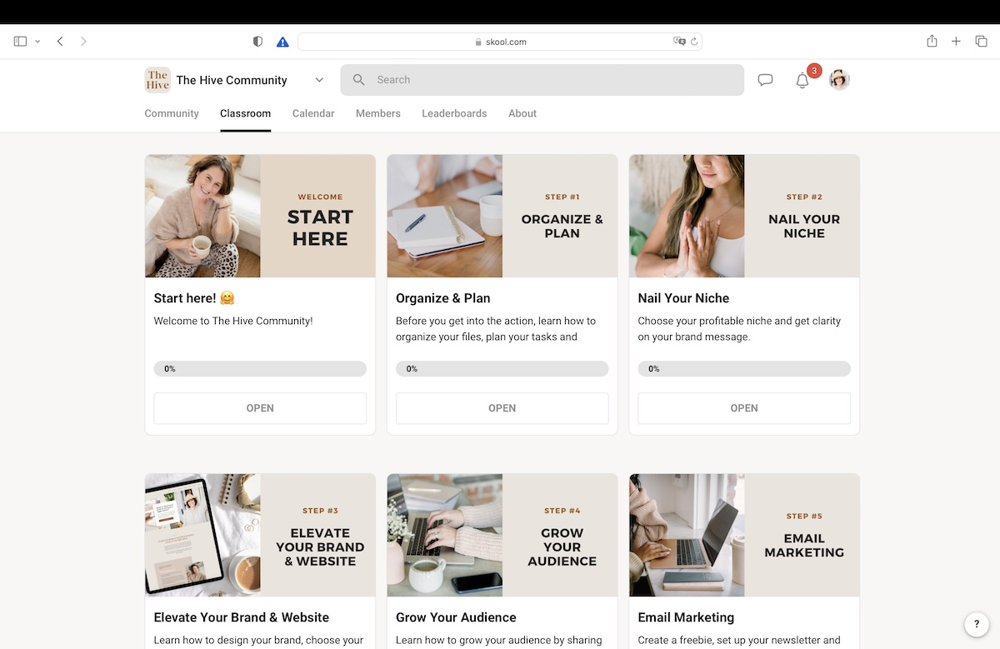
Figure: The Classroom tab allows you to organize your course content into a clean, module-based layout. Every Skool group comes with a “Classroom” where you can host online courses or resource libraries for your members. You can create multiple courses, each with sections (folders) and lessons (pages) to structure your content. For example, you might have a “Welcome Course” with onboarding lessons, and another course for your core training program. Members see a progress bar and completion percentage for each course, helping them track their learning.
Each lesson in the Classroom can include text, images, file downloads, and embedded videos. Note: Skool does not store video files natively – instead, you embed videos from YouTube, Vimeo, Wistia, Loom, or similar. This approach keeps the platform lightweight, but it means you’ll need an external video host (YouTube unlisted videos work fine for most, or Vimeo for more control). It’s a trade-off: you won’t get advanced video analytics or in-player quizzes, but you also won’t burn through storage or pay extra for video hosting. For most coaches and course creators, embedding works just fine (and it’s secure – you can use unlisted links or private video URLs).
Despite being basic, the course builder covers essential needs. You can drip release content by setting a “time unlock” (e.g. lesson unlocks X days after joining) or require a certain level unlock (tying into gamification – e.g. reach Level 3 to access a bonus module). You can also set courses as free or paid “one-time purchase” items. New in 2025: Skool introduced one-time paid courses, meaning you could sell a standalone course inside your community without requiring a recurring membership. This adds flexibility to your monetization – you might have a free community but charge for premium courses, or vice versa.
The Classroom interface is very user-friendly for members. Lessons are listed in order, and there’s a searchable transcript feature if you provide video transcripts (Skool can index them so members can search within your video content). One limitation is that Skool currently has no quiz or assignment functionality for courses – so if you need to test your students or award certificates, you’d need an external tool. Skool is best for content consumption and community discussion around that content, rather than formal coursework with grading. For most creators focused on coaching, tutorials, or cohort-based learning, this is a non-issue, but it’s worth noting.
Content Protection: Since content is behind a login, only your members can view it. There is no DRM on videos (since they’re embedded), but you can mark certain courses to only unlock at a certain member level or for paying members. This gamified gating can actually motivate people to engage more in the community so they can access locked trainings (a clever way to increase participation).
In short, Skool’s Classroom gets the job done for delivering learning materials. It’s not as feature-rich as a dedicated LMS, but it’s intuitive and integrates seamlessly with the community – which means learners are more likely to actually consume your content and discuss it, rather than lose interest.
Events Calendar and Scheduling

Figure: Skool’s Calendar lets you schedule events like live calls, webinars, or meet-ups for your community. In the Calendar tab, you can create events with a date, time, and description. Members will see upcoming events in a familiar monthly calendar view (or a list view if they prefer) and can click to see details or join links. Events can be one-time or recurring.
While Skool doesn’t have built-in livestreaming, you can easily integrate Zoom, YouTube Live, Google Meet, or any link. For example, you might schedule a weekly coaching call: you create the event in Skool with the Zoom link, and members can RSVP or simply show up via that link. Email Reminders: Skool will automatically send reminder emails to your members before the event (configurable, e.g. 1 day and 1 hour before), which is great for boosting attendance. Additionally, a banner appears in the community feed near the event time to remind people about it.
One very convenient feature is automatic time zone conversion – events show in each user’s local time zone. So if you schedule something for 5pm EST, a member in London will see it as 10pm GMT on their calendar. This removes a lot of confusion for global communities.
Skool’s calendar received some enhancements in late 2024, including the ability to set event access permissions just like courses (you can make certain events only visible to members above a certain level or who own a certain course). This is useful if, say, you have different tiers of members and want to offer exclusive calls to a subset. They also added minor improvements like better mobile view and the option for members to add events to their personal Google or iCal calendars.
Overall, the Calendar tab is simple but effective. It keeps your community informed about what’s happening and when. From weekly Q&As to product launch dates, having a centralized schedule inside the group helps coordinate your community without relying on separate email sequences or Facebook events. Several users highlight the calendar as a favorite feature – it’s seamlessly integrated and significantly increases event turnout.
Gamification: Points, Levels and Engagement Boosters
One of Skool’s signature features is its gamification system – designed to make participating in the community fun and rewarding. Every time a member contributes, they can earn points that translate into levels on their profile. By default, members get +1 point when someone likes their post or comment. As points accumulate, they level up (Level 1 through 9 by default, with exponentially increasing points required). The admin can rename the levels to fit the community theme (for example, levels could have titles like “Newbie” up to “Expert”).

Figure: Leaderboards spark friendly competition among members. Skool automatically tallies points and displays leaderboards for the past 7 days, past 30 days, and all-time top contributors. This resets weekly/monthly to give newcomers a chance to shine. Members love seeing their name on the leaderboard and often compete to climb higher by posting more or engaging with others’ content. As the community leader, you can further incentivize this by offering prizes or recognition to top members if you want.
Gamification isn’t just for vanity – it has a practical use: unlocking content. You can configure certain courses or even events to require a minimum level to access. For instance, you might lock an “Advanced Training” course until someone reaches Level 5 (meaning they’ve been quite active in the group). This encourages newcomers to participate more so they level up and get the goodies. It’s a clever way to reward engagement with real value, creating a win-win dynamic. One reviewer noted that tying course access to leaderboard status “encourages members to engage in discussions to unlock resources”.
Skool’s gamification is optional – if you don’t care for it, you don’t have to use level-locked content. But the points system runs by default and we’ve found it absolutely helps in sparking life in new communities. People are naturally competitive or at least curious about their level. Even a small dopamine hit from leveling up can increase their attachment to the group. And for you as the creator, it’s essentially an automated engagement driver that runs in the background.
One thing currently missing is achievement badges. Aside from levels, there aren’t specific badges for milestones (e.g. “Posted 100 times” or “Completed X course”). Some competitors like Circle or forum plugins offer badge systems. Skool doesn’t have this yet (as of early 2025), though the team has hinted at adding a badges feature in the future. In practice, levels and leaderboards have been sufficient to boost activity. Also, since Skool’s philosophy is not to over-engineer, they’ve likely held off on badges to keep things simple.
In summary, Skool’s gamification is a big plus if you want to increase community engagement. It works seamlessly – members earn points without any extra effort, and the friendly competition tends to organically encourage more contribution. If you prefer a more serious or formal atmosphere, you can downplay it, but most groups (even professional ones) enjoy a little gamified motivation.
Mobile App Experience (2025 Updates)
A critical factor for any modern platform is the mobile experience, and Skool has made great strides here. Skool offers free mobile apps for both iOS and Android, allowing members to participate in the community on the go. Early on, Skool was web-only, but as of 2024 the native apps were launched and have steadily improved. By 2025, the apps include virtually all the functionality of the web version: users can read and create posts, watch course videos, check the calendar, send DMs, etc., all from their phone. Push notifications are fully supported, which is huge for engagement – members get an alert for new content instantly, rather than having to check email.
Alt: Official description of Skool’s app features from the App Store. Figure: The Skool mobile app lets members stay connected with push notifications for new posts, messages, and events. In 2025, the app experience is smooth and user-friendly. Notably, Skool added a dark mode icon and interface on iOS in a recent update to please users who prefer darker themes. They’ve also optimized performance (like faster loading of videos and posts) in version 1.1.x with bug fixes coming regularly. Some users had reported issues with video playback in early versions, but these have been largely addressed by now – the team pushed updates to improve buffering and stability.
From an admin perspective, you’ll appreciate that mobile app adoption can significantly increase how often members engage. People often treat a Skool community like a social media app – checking in on the feed during idle moments, responding to notifications, etc. Because the app is dedicated just to your community (and any other Skool groups they join), it enjoys the focus that a Facebook group inside the Facebook app would not. One member review mentioned they were “so elated to be part of [our] community” through the app, finding it even better than typical social platforms for learning and connecting.
Tip: Encourage your members to download the app when they join your community. It’s free and available publicly on the app stores; they just log in with their Skool account. With push notifications enabled, you’ll find engagement can soar (Skool also sends a daily email summary by default, but instant mobile notifications make a big difference in responsiveness).
Bottom line: Skool’s mobile apps in 2025 are a strong asset. They have matured to the point where mobile and desktop offer a seamless experience. This removes a barrier for any community member who prefers using a phone or tablet – they won’t miss anything and can stay involved from anywhere.
Pricing: How Much Does Skool Cost?
One of the refreshing aspects of Skool is its simple pricing model. There is just one plan that unlocks everything: $99 USD per month for each community group you run. Unlike some platforms, Skool doesn’t impose caps on members or require you to upgrade as you grow – you can have 50 members or 50,000 members for the same price, and you can create unlimited courses/content for them. Every feature (community, classroom, calendar, gamification, etc.) is included in that flat fee.
Skool offers a 14-day free trial for new group creators, so you can test it out for two weeks with no commitment. (You’ll need to enter a credit card to start the trial, but you won’t be charged if you cancel before 14 days are up.) Currently, there is no permanent free tier – Skool is a premium product aimed at serious community builders, so after the trial you’ll pay the subscription. The good news is that in late 2023, annual billing became available, letting you save ~16% by paying for a year upfront. The annual plan is about $990/year (essentially giving you two months free vs. monthly). Many users requested this, and now it’s an option in your billing settings – if you know you’ll stick with Skool for the long haul, the annual plan brings the effective cost down to roughly $82.50 per month.
For most coaches or businesses running a membership, $99/month is very reasonable considering you might be charging each member $20, $50, $100+ per month for access. Just a handful of members can cover your Skool fee. Also, unlike some competitors, Skool does not take a percentage of your sales. You keep 100% of revenue from your community or courses (aside from standard Stripe payment processing fees). This flat pricing approach gives a lot of predictability – you won’t be hit with overage charges or need to upgrade just because your community got more active.
If you need to run multiple completely separate communities (unrelated groups with different members), you would need a separate subscription for each. Skool is designed around one community per account. However, many creators find one community is enough, and they utilize course access or private sub-groups to segment within that community if needed rather than pay for multiple groups.
Are there discounts? Aside from the annual discount, there aren’t coupon codes or lifetime deals for Skool. The company has generally held the line on $99 being the fairest price for everyone (they have occasionally done promotions for nonprofits or special cases, but those are rare). The value you’re getting – effectively replacing a Facebook group, a course platform, a Zoom event scheduler, and even an email marketing tool (for broadcasts) – tends to justify the cost if you’re actively monetizing your community.
Affiliate Program: Earn 40% Commissions by Referring Skool
One exciting development as of 2024 is Skool’s affiliate program, which can actually turn the platform into an income stream for you. If you love Skool and share it with others, you can earn a 40% recurring commission for every new customer who signs up through you. Importantly, this is a lifetime commission – you continue earning 40% of the monthly (or annual) subscription from each referral, for as long as they remain a paying user. On a $99/mo plan, that’s about $39.60 per month per referral. Three referrals basically earn you ~$119 which already exceeds your own subscription cost – meaning you could get your Skool group for free, and then some!
Skool’s affiliate system works in two ways:
- Invite from your Community: If you have a Skool group and one of your members goes on to create their own Skool community, it’s automatically attributed to you (this was the original “auto-affiliate” mechanism). Many users organically asked “what platform is this?” and ended up starting their own group – Skool ensures you get credit if they came through your group.
- Direct Referral Link: Now you also get a unique affiliate link you can share anywhere (YouTube, blog, etc.). Anyone who clicks and signs up for a trial will be tied to you. Even if you don’t run a Skool group yourself, simply having a Skool user account gives you an affiliate link. This means fans of the platform can earn by recommending it, just like formal affiliates.
The commission is paid monthly (or annually, if the customer paid yearly). Skool handles the tracking and payouts – you can view an affiliate dashboard showing your referrals and earnings. According to one affiliate, “Skool has been paying me $39/mo for every community my referrals have created” reliably. In addition, Skool has run contests and leaderboards for top affiliates as part of Skool Games (a marketing initiative spearheaded by investor Alex Hormozi). Top referrers have gotten prizes like cash bonuses or even a day of consulting with Hormozi. It’s clear Skool is investing in growth through this affiliate channel, which is great news if you plan to promote it.
From an affiliate marketing standpoint, 40% recurring is extremely generous (many software pay 20-30% or only one-time bounties). If you coach other creators or entrepreneurs, introducing them to Skool could become a nice side income. Skool’s public community provides resources (like an “Affiliates 101” mini-course and promo materials) to help affiliates succeed. Just remember, the best way to refer is by showing others the value you’re getting – e.g. inviting peers into your Skool group to see it in action, or creating content about how you use Skool for your business.
Tip: If you do refer others, you can essentially offset your Skool costs. For example, if you refer 3 people who stick around, you’d earn around $3 * $39 = $117 per month, which covers your $99 and leaves a bit extra. This “pays for” your community, as Skool cheekily points out. It’s not a pyramid scheme or anything; it’s simply a referral reward for spreading the word. If you don’t want to bother with it, no problem – it’s there if you’re interested. Many users find they naturally end up referring friends because they genuinely enjoy the platform.
Who Should Use Skool?
Skool is an excellent choice if you are building a membership community or course-based community and want to keep everything under one roof. Typical users include coaches, mastermind leaders, online course creators, consultants, and niche community builders. If you value engagement and interaction with or among your members, Skool’s design serves you very well – arguably better than piecing together a Facebook group (distracting) + separate course site (disconnected). For instance, a fitness coach running a paid group can host workout lesson videos in Classroom, use Posts for daily accountability check-ins, schedule live Zoom classes via Calendar, and let members encourage each other via the leaderboard. That kind of integrated experience drives greater results and retention.
On the other hand, if you primarily just sell standalone courses and don’t care about community, Skool may be less appealing than a pure LMS like Teachable. Skool really shines when you leverage the community component. Also, very large enterprises or academic institutions that need complex testing, grading, or multiple roles might find Skool’s simplicity limiting – but those cases are rare for Skool’s target market.
Some specific scenarios where Skool is ideal in 2025:
- Coaching Programs & Masterminds: Deliver coaching materials and foster peer support (client-only community, weekly calls, etc.) in one place.
- Course + Community Combos: If you usually use Kajabi/Thinkific for courses and a Facebook Group for community, Skool provides a more integrated and higher-engagement alternative.
- Subscription Memberships: Skool can host your membership site content and discussions, and charge members monthly or annually through the Stripe integration (no need for an extra membership plugin).
- Customer Communities: Some businesses use Skool to host communities for their customers (e.g. a SaaS company creating a user community with how-to courses and discussion). It’s a great way to increase customer success.
- Free Communities with Monetization Upsell: You could run a free community on Skool to grow a following, then sell premium courses or coaching within it. Skool now supports offering both free and paid content side by side.
Final Verdict: Is Skool Worth It in 2025?
After deep testing and considering all the updates in 2025, Skool stands out as a top platform for building an engaged online community around your content. Its strength is in creating a focused, gamified environment where members actually connect and keep coming back, which is invaluable for course completion and community longevity. The development team has continued to refine the experience (mobile apps, one-time course sales, annual billing, etc.), showing a commitment to meeting users’ needs.
Of course, no platform is perfect. Skool deliberately forgoes certain features (quizzes, complex sales funnels, flashy site themes) in favor of a lean, user-friendly system. For many experts and creators, this is actually a positive – it means less tech headache and more focus on delivering value and fostering connections. As one creator noted, “Skool gives you everything you need, and nothing you don’t.” If your goal is to build a vibrant community learning experience, Skool provides the essential tools to make it happen, without bloat.
Bottom line: If you’re considering switching to Skool or launching a new community, it’s definitely worth a try. The 14-day free trial lets you get hands-on and even onboard some beta members to see their feedback. Many users report higher engagement and satisfaction after moving to Skool from other platforms – members love the clean, all-in-one space and the fun of leveling up. Given the potential for increased retention (and even affiliate kickbacks), the ROI on that $99/month can be easily achieved.
Ready to give Skool a spin? Start your free 14-day trial at Skool.com and experience firsthand how a combined community + course platform can elevate your business or group. With Skool’s simplicity and powerful engagement features, you might find it’s the community platform you’ve been waiting for. Good luck, and see you on the leaderboard!


