

Skool Pricing 2026: Hobby vs Pro, Fees, Features & How It Compares
Skool pricing in 2026 is refreshingly simple—but the “best plan” depends on one thing most people forget to calculate: your revenue (and the fees that come with it).
If you’re looking at Skool to build a paid community, sell courses, or run a membership with gamification built in, this guide breaks down exactly what you pay, what you get, and how Skool stacks up against other popular platforms.
Skool Pricing at a Glance (2026)
Skool currently offers two creator plans. Both include the core product (community + courses + gamification + events). The difference is mostly about fees, branding/control, and scaling features.
| Plan | Cost (per community) | Admins | Transaction fee (Skool Payments) | Best for |
|---|---|---|---|---|
| Hobby | $9/month | 1 admin | 10% + $0.30 per transaction | Testing an idea, solo creators, low revenue, free communities, “MVP” launches |
| Pro | $99/month | Unlimited admins | 2.9% + $0.30 (typical) (higher % applies to very high-priced transactions) | Scaling a real business, team/admin support, cleaner branding, automation + growth |
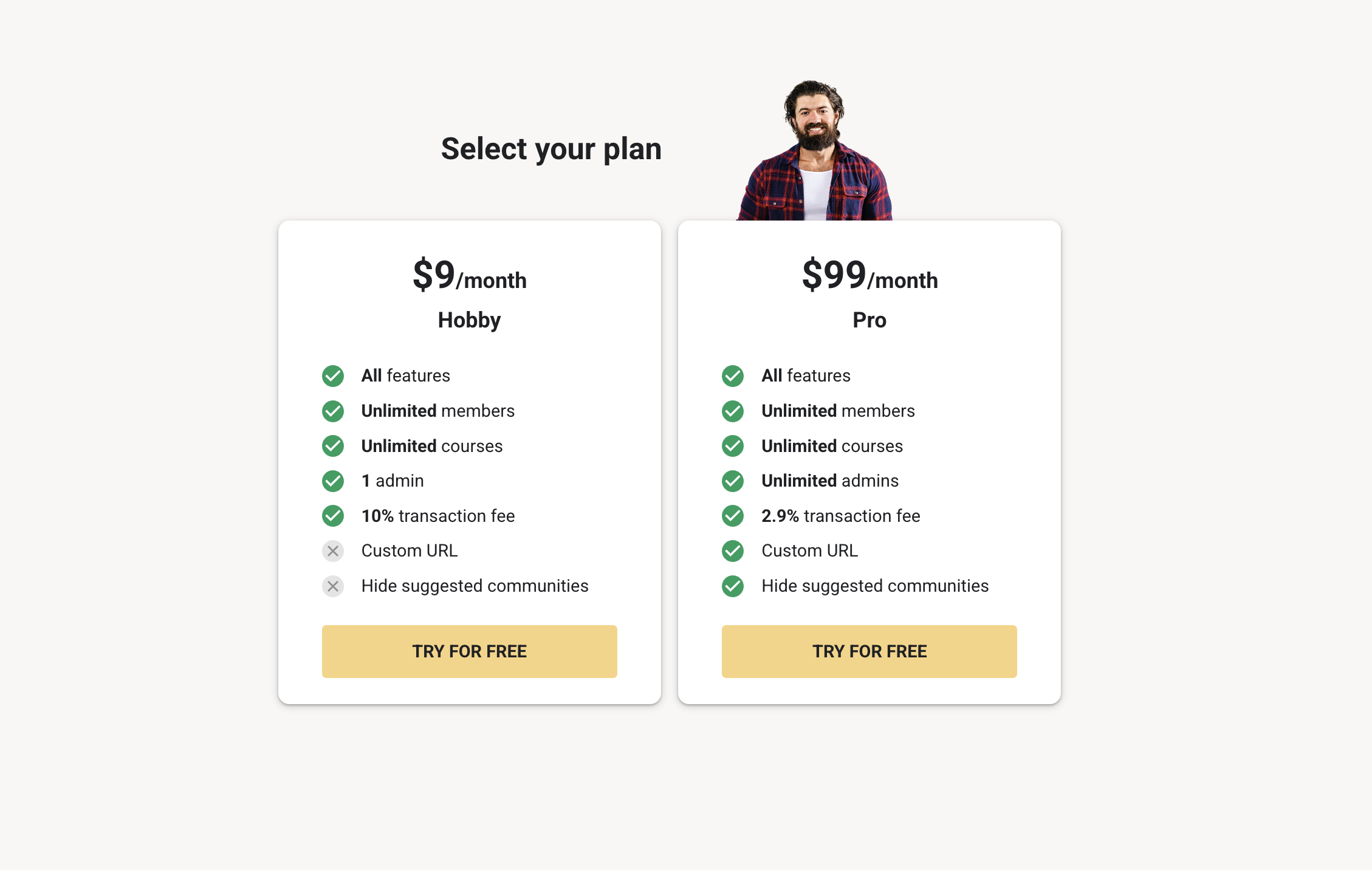
Above: the two Skool creator plans. Both include the core platform, but Pro unlocks more control (like custom URL and hiding suggested communities) and comes with much lower fees.
What You Get on Both Plans
Regardless of whether you start on Hobby or upgrade to Pro, Skool is built around one idea: make the community the product (and let courses/events support the community).
- Community feed where members post, comment, and engage (clean + distraction-free compared to social media)
- Courses / Classroom to host structured content alongside your community
- Gamification with points, levels, and leaderboards that reward participation
- Events & calendar for scheduling live calls, workshops, challenges, meetups, and more
- Member profiles, DMs, and engagement tools to keep the experience interactive
- Payments + recurring billing built in via Skool Payments (so you can sell memberships without duct-taping tools together)
Hobby vs Pro: What’s Actually Different?
Here’s the “real-world” difference between the plans—without fluff.
- Transaction fees: Hobby takes a much bigger cut (10% + $0.30). Pro is dramatically lower (typically 2.9% + $0.30).
- Admins: Hobby is designed for solo use (1 admin). Pro supports teams (unlimited admins).
- Brand control: Pro lets you use a custom Skool URL (cleaner brand link) and hide suggested communities (so your members aren’t being shown other groups in the sidebar).
- Growth features: Many “scale” tools are naturally built for Pro usage—especially when you start caring about workflows, onboarding, and retention.
Skool Transaction Fees Explained (2026)
This is where most pricing articles get it wrong: Skool’s fees aren’t just “Stripe fees.” Skool runs payments through Skool Payments, and the platform’s fee structure is part of your plan choice.
Why it matters: If you’re charging members every month, the fee difference between Hobby and Pro becomes huge—fast.
Quick break-even math: when does Pro become cheaper?
Ignoring the small $0.30 per-transaction component (because it depends on how many payments you process), the break-even point is roughly:
Hobby: $9 + 10% of revenue
Pro: $99 + ~2.9% of revenue
That means Pro often starts making financial sense around $1,200–$1,400/month in membership revenue. Below that, Hobby is usually cheaper. Above that, Pro typically saves money—and unlocks better control for growth.
How Skool Compares to Competitors in 2026
Skool’s pricing is simple, but competitors often offer broader “all-in-one” toolsets—or deeper customization. Here’s a practical comparison based on what most creators actually need: community + learning + payments.
Skool vs Mighty Networks
Mighty Networks is often chosen by creators who want a more “social network” feel (topics, spaces, richer community structure) and advanced community experience. Pricing is usually higher than Skool for comparable setups—especially as you scale features and branding.
Choose Skool if: you want simplicity, fast setup, built-in gamification, and you don’t want to over-customize.
Choose Mighty Networks if: you want deeper community structure and are happy paying more for richer social features.
Skool vs Circle
Circle is a strong alternative when you care about cleaner brand control, customization, and more “community ops” features. It’s powerful—but the pricing ladder is steeper once you want the good stuff.
Choose Skool if: you want a community-first product that’s easy for members and designed for engagement.
Choose Circle if: you need more flexibility, customization, and advanced community management tools.
Skool vs Kajabi (and “true all‑in‑one” platforms)
Kajabi is not really a “Skool clone.” It’s a full business suite: website, funnels, email, and course hosting—with community features layered in. If you want everything under one roof, Kajabi can make sense. If your priority is engagement, Skool often wins on simplicity.
Choose Skool if: the community is your product and you want a platform that nudges people to participate.
Choose Kajabi if: you want websites + funnels + email marketing built in and can justify the higher monthly spend.
Skool Pricing FAQs (2026)
- Is there a free plan? No “free forever” plan. There is a 14‑day free trial to test everything.
- Do I need a card for the free trial? In most cases, yes—Skool collects payment details so your trial can roll into your chosen plan (unless you cancel).
- Is it $9/$99 for unlimited communities? No. It’s priced per community. If you run multiple communities, each community has its own subscription.
- Are there hidden fees? No confusing “feature unlock” upsells. The real costs to understand are: your plan fee + transaction fees (and any external tools you choose to connect).
Final Verdict
If you want the simplest way to run a community + courses business in 2026, Skool is hard to beat. The only “gotcha” is picking the right plan for your stage:
- Start on Hobby if you’re validating, building your first members, or staying under ~$1.3k/month.
- Switch to Pro when you’re scaling, need a clean URL/brand control, want team admins, or your revenue makes the lower fee structure worth it.
Disclosure: This page contains affiliate links. If you sign up through them, we may earn a commission at no extra cost to you.


