

Last updated: February 2026 Try Skool (free trial): click here
The quick verdict
Skool is built for one main thing: running an online community that doesn’t die after week two—while also letting you host courses, schedule events, and monetize without duct‑taping five tools together.
It’s not the most customizable platform. It’s not a full marketing suite. And it’s not trying to be either.
But if your business depends on people showing up, talking, and staying, Skool is one of the most practical platforms you can pick in 2026.
Try Skool here: https://skoolco.com/skool
Skool in 60 seconds
Here’s the mental model:
- Community = the feed (posts, categories, comments, DMs, announcements)
- Classroom = courses (lessons/pages, resources, video, progress)
- Calendar = events, calls, recurring sessions, reminders
- Leaderboards = gamification (points + levels)
- Members + Roles = manage access, moderation, activity
- Optional extras = map, plugins, tiers, automation (plan-dependent)
The main reason Skool works: it’s opinionated. It forces simplicity. And that simplicity reduces friction for members.
What Skool is (and what it’s not)
Skool is:
- A community platform with a clean, predictable feed (no algorithm chaos like Facebook).
- A course area (“Classroom”) that’s simple enough to actually maintain.
- A system built around engagement loops (leaderboards + levels).
- A monetization engine for memberships, tiers, and paid course access.
- A platform where your members don’t need to learn 20 buttons to participate.
Skool is NOT:
- A full funnel builder (landing pages, email sequences, complex automations).
- A highly customizable “design playground.”
- An enterprise LMS with SCORM, deep testing, complex certificates, etc.
- A white‑label product with your own branded mobile app name/icon.
If that list sounds limiting: good. Skool succeeds because it refuses to become complicated.
Skool’s layout explained: the “tabs” that matter
A typical Skool community is organized into a few main tabs. The exact tabs can vary based on what you enable in settings, but the common layout looks like:
- Community (feed + categories)
- Classroom (courses)
- Calendar (events/calls/webinars)
- Members (member list + management)
- Leaderboards (points/levels)
- About (your community’s “sales page” inside Skool)
- Map (optional)
Map example (optional tab)

DEMO: Build a Skool community from scratch (step‑by‑step)
This is the practical walkthrough most “reviews” skip.
Step 1: Create the container (your group)
Start with a clear promise. Not “Welcome to my community.”
More like: “Lose 10 lbs in 8 weeks with daily accountability + weekly coaching calls.”
Your group name should answer:
- Who is this for?
- What outcome do they want?
- What’s the “style” (challenge, mentorship, accountability, study group)?
Step 2: Set up your About page
Your About page is basically your conversion page inside Skool. It’s where new visitors decide if they join (or pay).
About page sections that actually convert:
- Who this is for (and who it’s not)
- The promise + timeline (clarity beats hype)
- What members get weekly (specific cadence)
- “Start here” steps (reduce overwhelm)
- Proof (short, real, not cringe)
Step 3: Add categories to keep the feed readable
Categories stop your community from becoming one endless stream of randomness.
A high-performing category setup usually looks like:
- Start Here (admin-only posting)
- Wins (members share progress)
- Questions
- Accountability
- Resources
- Calls & Replays
The goal is not “more categories.”
The goal is less friction finding the right place to post.
Step 4: Pin your “Start Here” post
Pinned posts are your onboarding system.
Your pinned post should include:
- A quick welcome
- The 3 steps to get started
- One simple “first action” (comment with goal, intro template, etc.)
- Where to find the course material
- Where to find the calendar / next event
Step 5: Build your first course (Classroom)
Skool course building is intentionally simple: folders/modules + pages/lessons.
Step 6: Create your first event (call / workshop / co‑working)
This is where Skool becomes “sticky.” People stay for events.
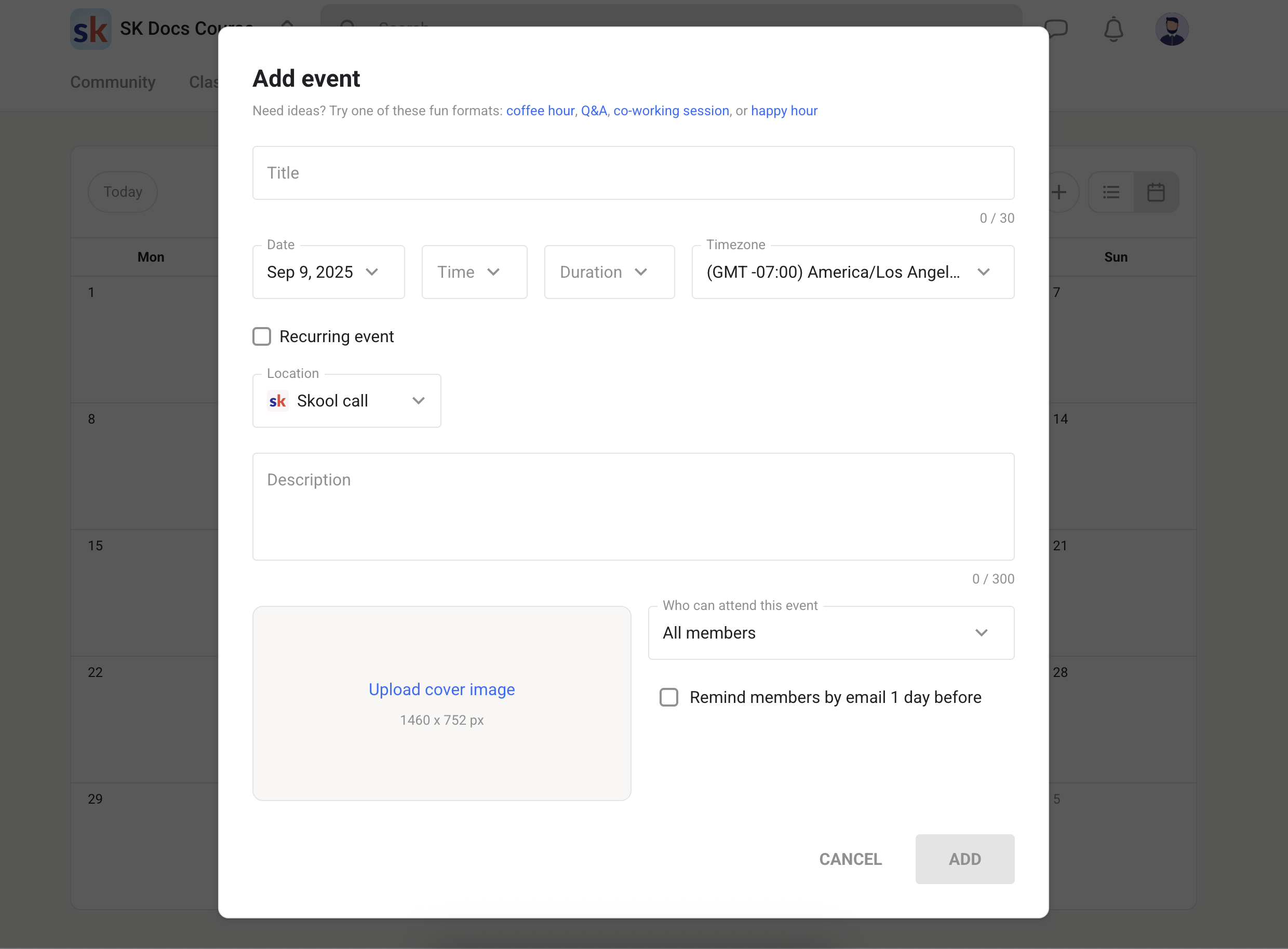
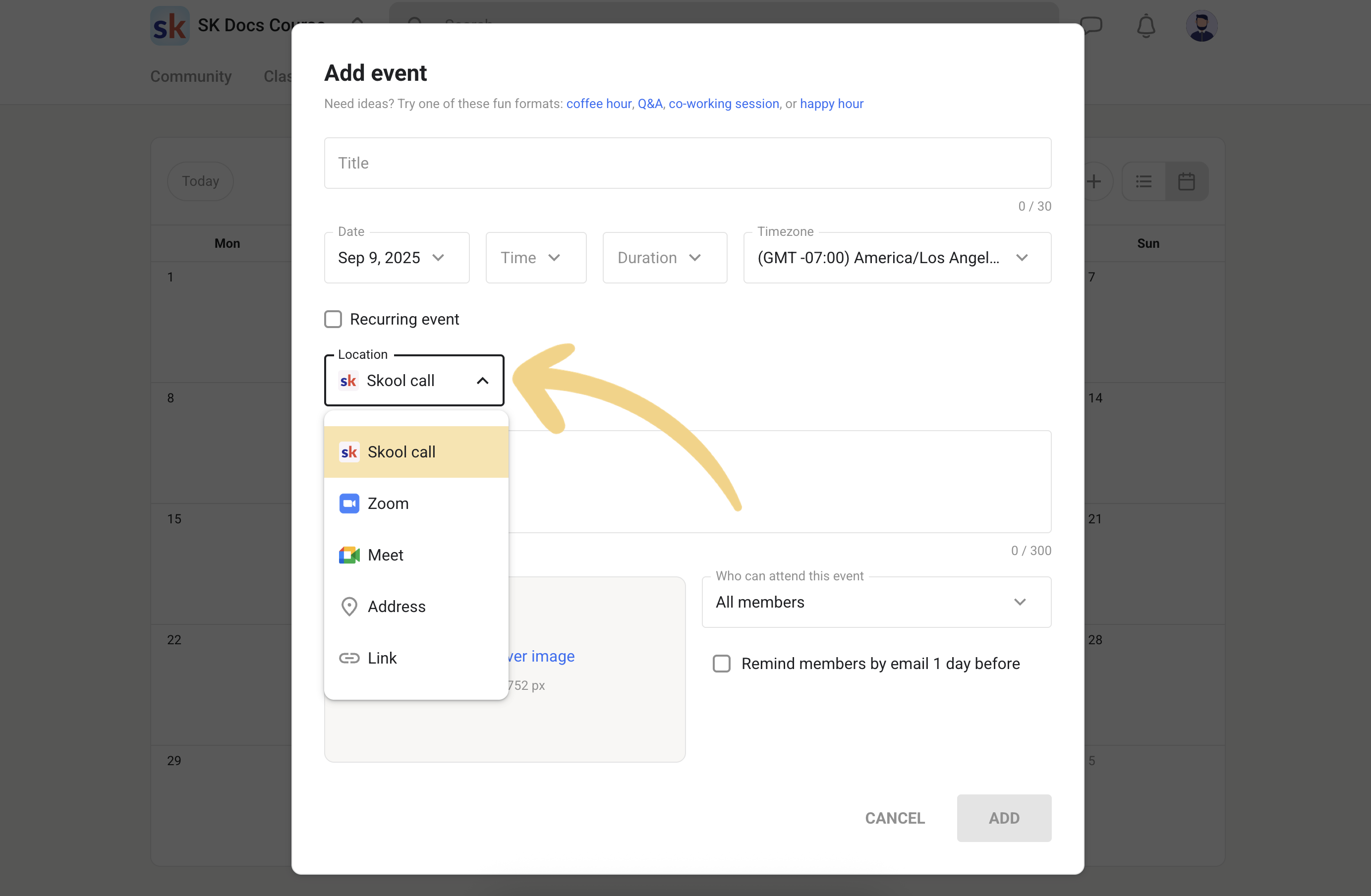
You can run events using Skool’s native call feature, or link out to Zoom/Meet.
Step 7: Add pricing (free, subscription, tiers, or one‑time options)
Skool supports different monetization models depending on how you want to run your community.
Step 8: Invite members
You can invite people using links, email invites, or importing.
Community features that drive engagement
Skool’s community feels familiar because it borrows the “feed” concept—but it removes many of the distractions.
1) Clean feed + categories
This matters more than it sounds.
A messy feed kills communities quietly.
2) Pinned posts = onboarding
Pinned posts act like a “front desk.”
Without them, every new member asks the same question and your regulars get tired.
3) Comments are the real game
A Skool community becomes valuable when:
- members answer each other
- micro‑wins are shared
- feedback loops happen daily
Skool nudges that behavior by making comments lightweight and fast.
Classroom & courses: how Skool handles learning
Skool’s course builder is built for delivery and completion, not for fancy “LMS theater.”
What you can do well in Skool Classroom
- Organize content into modules + lessons/pages
- Add video, text, links, resources, and discussion
- Let members comment directly under lessons (huge for completion)
- Create multiple courses without extra fees
- Control access (public, locked, paid, level‑based, tier‑based)
Course access controls (this is bigger than it looks)
You can set course access rules such as:
- available to all members
- unlocked at a certain level
- purchasable as a one‑time “Buy Now” course
- available after a delay (drip)
- available to selected members only
Native video hosting in 2026 (yes, it’s real now)
This is one of the biggest “update moments” for Skool.
In 2026, you can upload videos directly into Skool for:
- Classroom pages
- Community posts
- Comments
Uploading a video into a lesson


Captions + playback controls
You can also use captions and playback controls (speed/quality).
Community video (yes, even in comments)

Why this matters:
Native video reduces friction. People don’t want to jump between tabs, players, logins, embed issues, and “where’s the replay?” confusion.
Calendar, calls, live events, and webinars
Skool events are simple—but that’s the point.
Skool Call vs Webinar
- Skool Call = collaborative group call
- Webinar = one‑to‑many presentation style (typically Pro)

Event access controls
This is where Skool gets surprisingly powerful: you can restrict event access by level, tier, or course access.
Practical examples:
- Weekly call for everyone
- VIP call for higher tiers
- “Students only” call tied to a course purchase
- Level‑based call that rewards participation (smart gamification)
Gamification: points, levels, rewards, and why it works
Most platforms bolt gamification on as a gimmick.
Skool makes it part of the culture.
What the system does
Members earn points through engagement, level up, and see their rank on leaderboards.
The 9 levels (with point thresholds)
Here’s the structure:
- Level 1: starts here
- Level 2: 5 points
- Level 3: 20 points
- Level 4: 65 points
- Level 5: 155 points
- Level 6: 515 points
- Level 7: 2,015 points
- Level 8: 8,015 points
- Level 9: 33,015 points
Member profile shows level
Why it actually works
Because it supports the behaviors communities need:
- posting wins
- helping others
- showing up consistently
- finishing lessons
- participating in calls
And you can tie rewards to it (unlock courses, access, perks).
Members, roles, moderation, and “spam control”
Skool includes roles like:
- owner
- billing manager
- admin
- moderator
Moderators can handle approvals and moderation tasks without getting full access to everything.
Anti-spam controls that don’t ruin the experience
A genuinely smart option is restricting:
- posting until Level 2/3
- chat access until Level 2/3
That filters out drive-by spammers without punishing real members.
Monetization: memberships, tiers, and one‑time course sales
You can monetize Skool in a few clean ways:
1) Paid community membership
Charge monthly or annually for access to the whole group.
2) Freemium / tiers
Offer:
- free access for the basics
- paid tier for calls, advanced courses, VIP access
3) One‑time paid courses
You can sell a course inside the classroom even if the community itself is free (or paid).
This is a strong model when:
- you want a free lead magnet community
- but monetize via “Buy Now” courses or premium tiers
Skool pricing & fees (2026) with real examples
Skool’s creator pricing is simple:
- Hobby: $9/month
- Pro: $99/month
- Free trial: available via https://skoolco.com/skool
Platform transaction fees (what you actually pay on sales)
Skool charges a platform fee per transaction (in addition to your monthly plan).
Pro plan fee structure (per transaction):
- 2.9% + $0.30 up to $899
- 3.9% + $0.30 above $900
Hobby plan fee structure (per transaction):
- 10% + $0.30 for all transactions
Net payout examples (after Skool fees)
| Price charged | Pro net payout | Hobby net payout |
|---|---|---|
| $9 | $8.44 | $7.80 |
| $29 | $27.86 | $25.80 |
| $49 | $47.28 | $43.80 |
| $99 | $95.83 | $88.80 |
| $299 | $290.03 | $268.80 |
| $999 | $959.74 | $898.80 |
When does Pro become “worth it”? (simple break‑even)
If you’re doing paid memberships or paid courses, Pro usually pays for itself once your monthly revenue is around:
- ~$1,268/month (typical fee difference scenario)
- ~$1,475/month (high-ticket transactions above $900)
The logic: Pro costs $90 more per month than Hobby, but saves you a big chunk in transaction fees.
Plugins & automations (and what’s Pro‑only)
Plugins are how you add “power” without cluttering the main UI.
Plugin list (example screen)

Common plugins
- Membership questions (screening & onboarding)
- Auto-DM to new members (typically Pro)
- Zapier integration (typically Pro)
- Links block (typically Pro)
- Instant approval (typically Pro)
- Webhooks (typically Pro)
- Ad tracking plugins (typically Pro)
- Spam controls like unlock posting/chat at a level (available on plans)
Links plugin example

A good “links” setup:
- support email
- “Start Here” doc link
- booking link
- resources hub
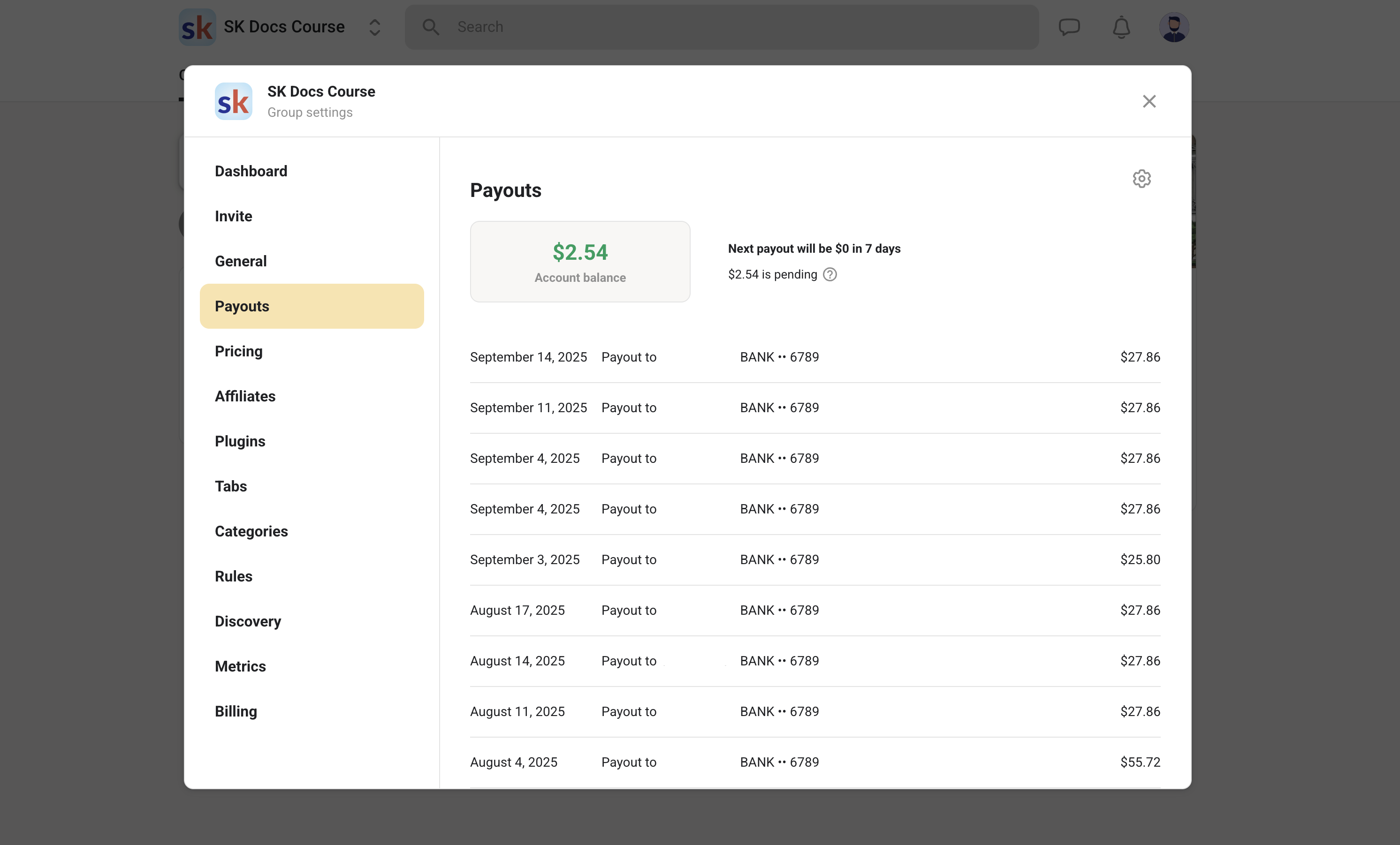
Payouts: how getting paid works
Skool payouts are streamlined, but it’s important to understand the flow.
- payouts are typically sent weekly (commonly on Wednesdays)
- first payout can take longer due to checks/verification
- payouts are deposited to your connected bank account
Mobile experience
Skool’s mobile experience is one of its strongest “quiet advantages.”
Members can:
- watch lessons
- comment
- join events
- get notifications
- stay engaged daily
The tradeoff: it’s not white-label. Your members use the Skool app.
For most creators, that’s a win. A branded app is expensive and usually underused.
Customization: how far you can (and can’t) push the look
Skool gives you:
- name + description
- logo + cover
- about page content
- categories/rules structure
- tab toggles (enable/disable things like Map)
It does not give you:
- deep theme control
- complex layout building
- heavy white-label options
That’s intentional. Skool is built so members don’t get lost.
Skool vs alternatives in 2026 (Circle, Kajabi, Facebook Groups, Discord)
Skool vs Circle
- Circle usually wins on customization and “community UX options.”
- Skool usually wins on simplicity + gamification + course+community in one flow.
If you want polished control, Circle is strong. If you want participation and simplicity, Skool often feels easier.
Skool vs Kajabi
- Kajabi is closer to an all-in-one marketing machine.
- Skool is closer to a community engine that monetizes cleanly.
If you need funnels, email automation, and a full website system in one tool, Kajabi can make sense. If you want community + courses + engagement, Skool is more focused.
Skool vs Facebook Groups
Facebook Groups are free, but:
- distractions are constant
- your members are one notification away from disappearing
- organization is weak
Skool is a paid home that stays focused.
Skool vs Discord
Discord is real-time and flexible, but:
- onboarding is harder for non-tech members
- content organization is messy for learning
- it’s harder to turn into structured education
Skool is built for learning communities where structure matters.
Who Skool is perfect for
Skool is a strong fit if you are:
- a coach running a paid membership
- a course creator who wants community + lessons together
- a consultant running a client portal/community
- a brand building a customer community
- a creator who wants a single place for calls, replays, posts, and learning
If you want members to actually participate, Skool is designed for that.
Who should avoid Skool
Skool may frustrate you if:
- you want deep branding/white-label everything
- you want complex funnels/email automations inside the platform
- you need enterprise LMS features (testing, SCORM, certificates, etc.)
- you want a “static” course site without community activity
My “best‑practice” Skool setup blueprint (copy/paste checklist)
Day 1: Foundation
- Write a one-sentence promise (who + outcome + timeframe)
- Build About page with clear structure
- Create 5–7 categories (including “Start Here”)
- Add a pinned post with a simple first action
Day 2: MVP Classroom
- Create 1 flagship course
- Keep it lean: 3 modules, 3–5 lessons each
- Add native video + short text summaries
- Add a “Next step” comment prompt under each lesson
Day 3: Engagement loop
- Schedule your first live event (even if only 30 minutes)
- Post a weekly rhythm message (what happens on which days)
- Set your gamification reward (unlock course, VIP call, etc.)
Day 4: Monetization
Pick ONE model first:
- paid community
- free community + paid course
- free + tiers
Don’t mix all three on day one.
Day 5: Invite
- Invite warm audience first
- Ask every joiner to comment on the pinned post
- Start conversations via DMs (or Auto-DM if you have it enabled)
Try Skool (free trial): https://skoolco.com/skool
FAQ
Does Skool include native video hosting now?
Yes—video can be uploaded directly to lessons/pages and can also be posted in the community (including comments).
Can I run calls inside Skool without Zoom?
Yes. You can host events using Skool’s native call option, and you can also choose Zoom/Meet/link/address depending on your event type.
Can I restrict content or events to VIP members only?
Yes—access can be controlled by things like level, tier, or course access.
Can I sell one-time courses without charging for the community?
Yes. You can run a free community and sell individual “Buy Now” courses inside the Classroom.
What’s the cheapest way to start?
Start with the free trial, then choose Hobby ($9/month) or Pro ($99/month).
Try it here: https://skoolco.com/skool
Is Skool “customizable”?
Structurally yes (tabs, categories, rules, courses, access logic).
Visually, it’s intentionally limited compared to design-heavy platforms.
Final thoughts
Skool’s biggest strength in 2026 is still the same idea it started with:
A community should be easy enough to use that people actually use it.
The platform is intentionally not “everything.” But what it does offer—community + courses + events + gamification + monetization—is built into a tight loop that encourages participation.
If you want a clean, scalable place where members can:
- learn
- show up
- talk
- and stick around
…Skool is a strong choice.
Try Skool here: https://skoolco.com/skool


